






Ecwon Malaysia
SIMPLE STEP TO REGISTER AS A MEMBER
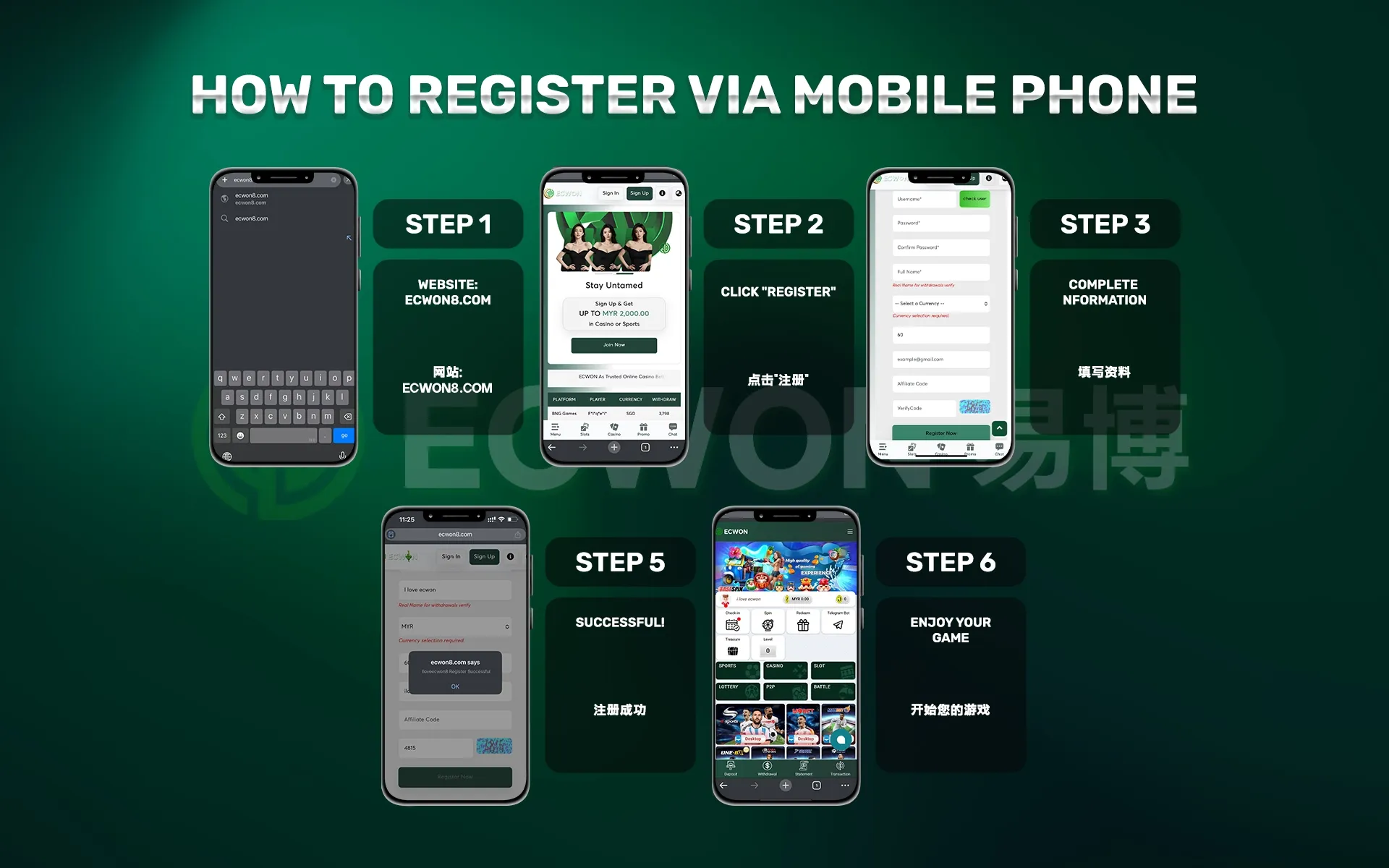
Please refer to the following steps for Register on Mobile:
Please refer to the following steps for Register on PC :
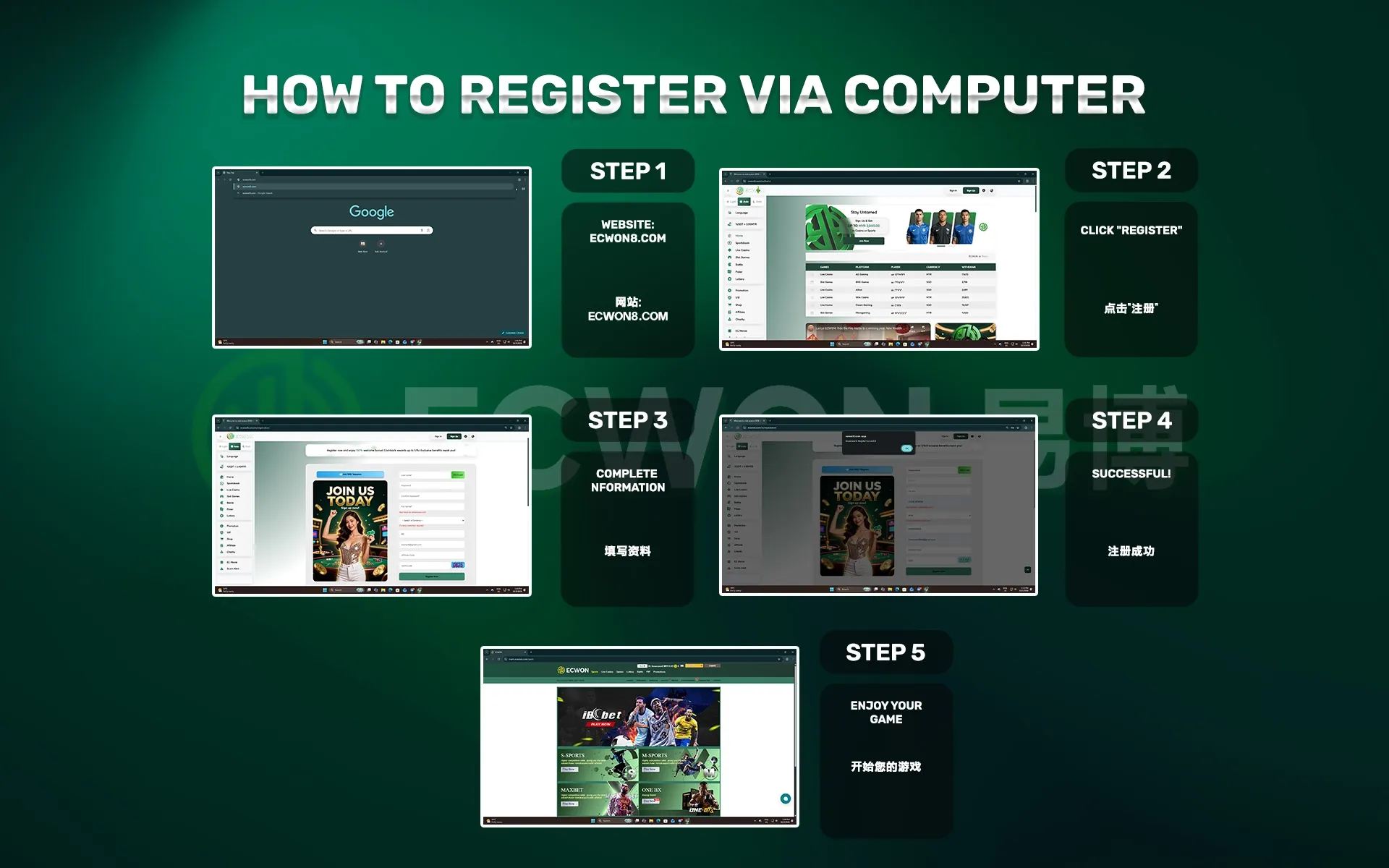
Step 1: Login to the website “ECWON”.
Step 2: Click the “Register Now” button.
Step 3: Fill in registration form.
Step 4: Click the "Register Now” button to complete registration.
Step 5: Start the game.
Congratulations! You’re all set !
FOUR WAYS TO CONTACT US
You can contact us 24/7 via Official Livechat , Whatsapp , Telegram or Wechat.
For more details and inquiries, please contact us : Contact-Us
EMAIL US YOUR FEEDBACK OR COMPLAINT
You can submit a feedback form to the relevant department via the following link: Feedback Form
For more details and inquiries, please contact us : Contact-Us
DEPOSIT VIA VADERPAY (PAYMENT GATEWAY)
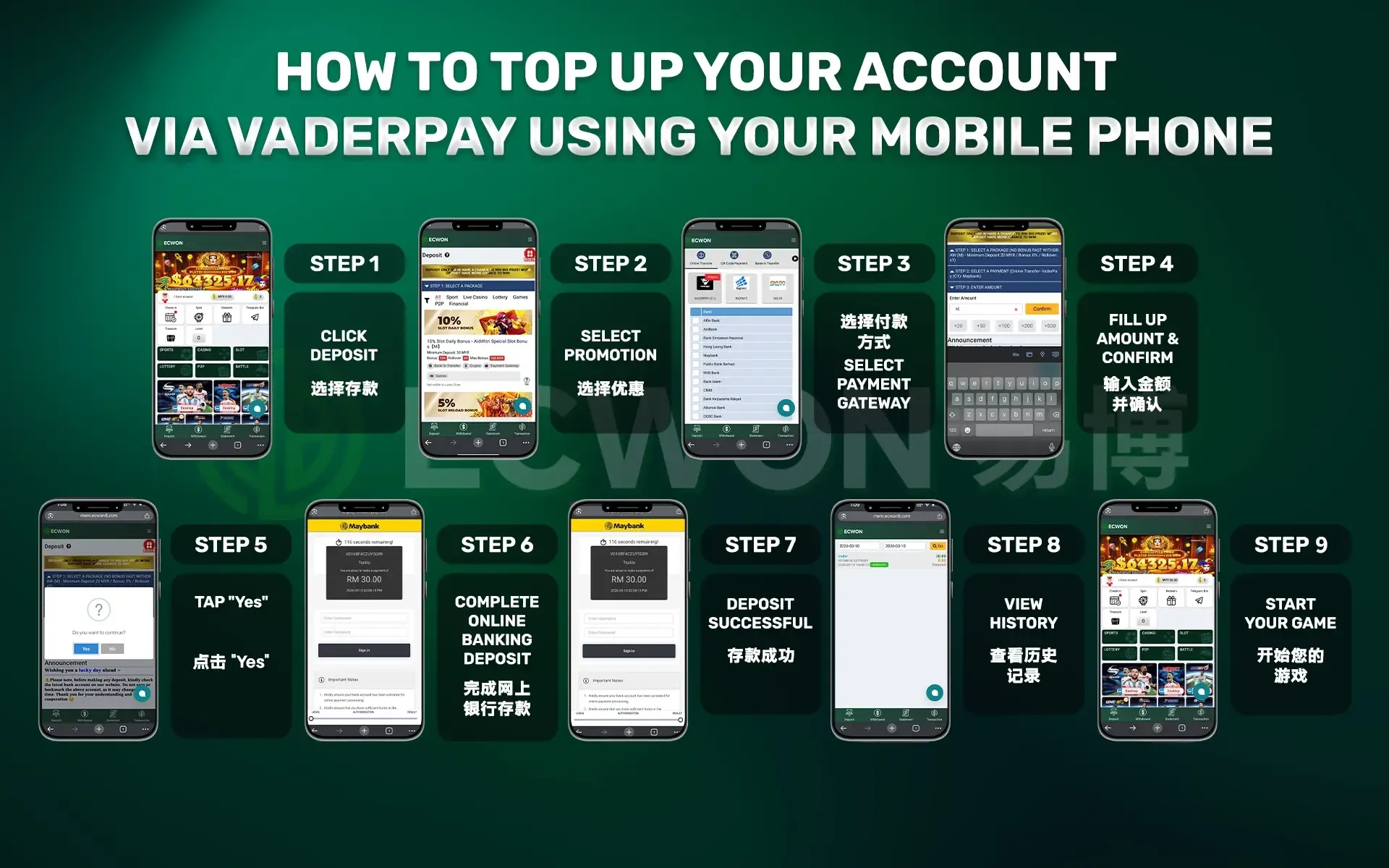
Please follow these steps to make a deposit via mobile phone :
Please follow these steps to make a deposit via computer :

Step 1: Log in to your game account and select "Deposit".
Step 2: Select a promotional offer.
Step 3: Select your top-up deposit method 【VADERPAY / BIGPAYZ】.
Step 4: Enter the amount you wish to top-up. then click "Next".
Step 5: Please carefully check your deposit amount and game promotion information, then click "Save".
Step 6: Top up complete.
After a successful top-up. you can check the top-up status.
NOTES: You can also top-up a deposit via online transfer, cash deposit (CMD), E-Wallet (Touch'n Go, Grab Pay, Shopee Pay, Boost Pay & DuitNow).
DEPOSIT VIA BANK TRANSFER
Please follow these steps to make a deposit :
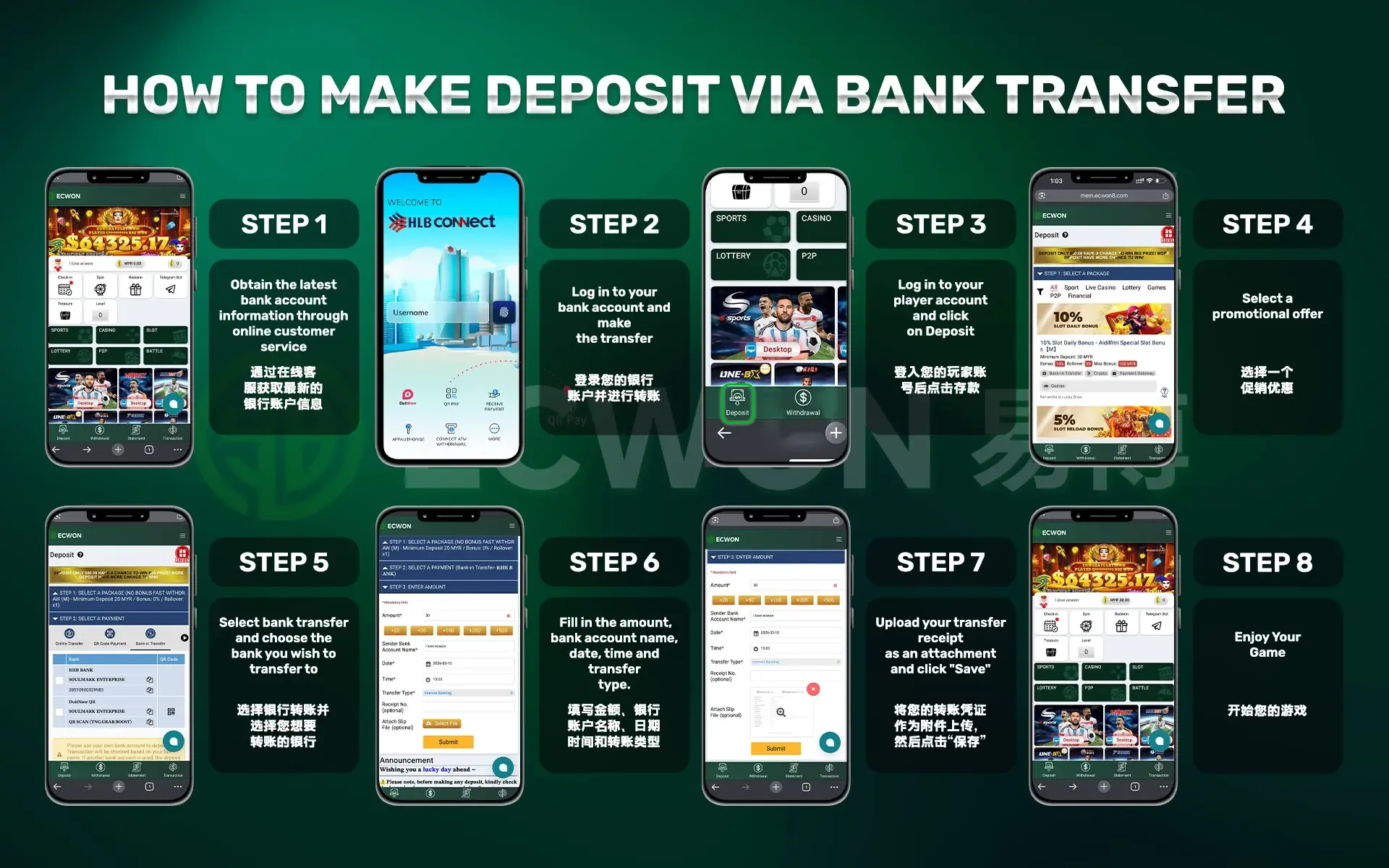
Step 1: Obtain the latest bank account information through online customer service.
Step 2: Log in to your bank account and make the transfer.
Step 3: Log in to your player account and click "Deposit".
Step 4: Select a promotional offer.
Step 5: Select bank transfer and choose the bank you wish to transfer to.
Step 6. Fill in the amount, bank account name, date, time and transfer type.
Step 7. Upload your transfer receipt as an attachment and click "Save".
After a succeesful top-up. you can check the top-up status.
DEPOSIT VIA G2POINT APP(PAYMENT GATEWAY)
Please follow these steps to make a deposit:
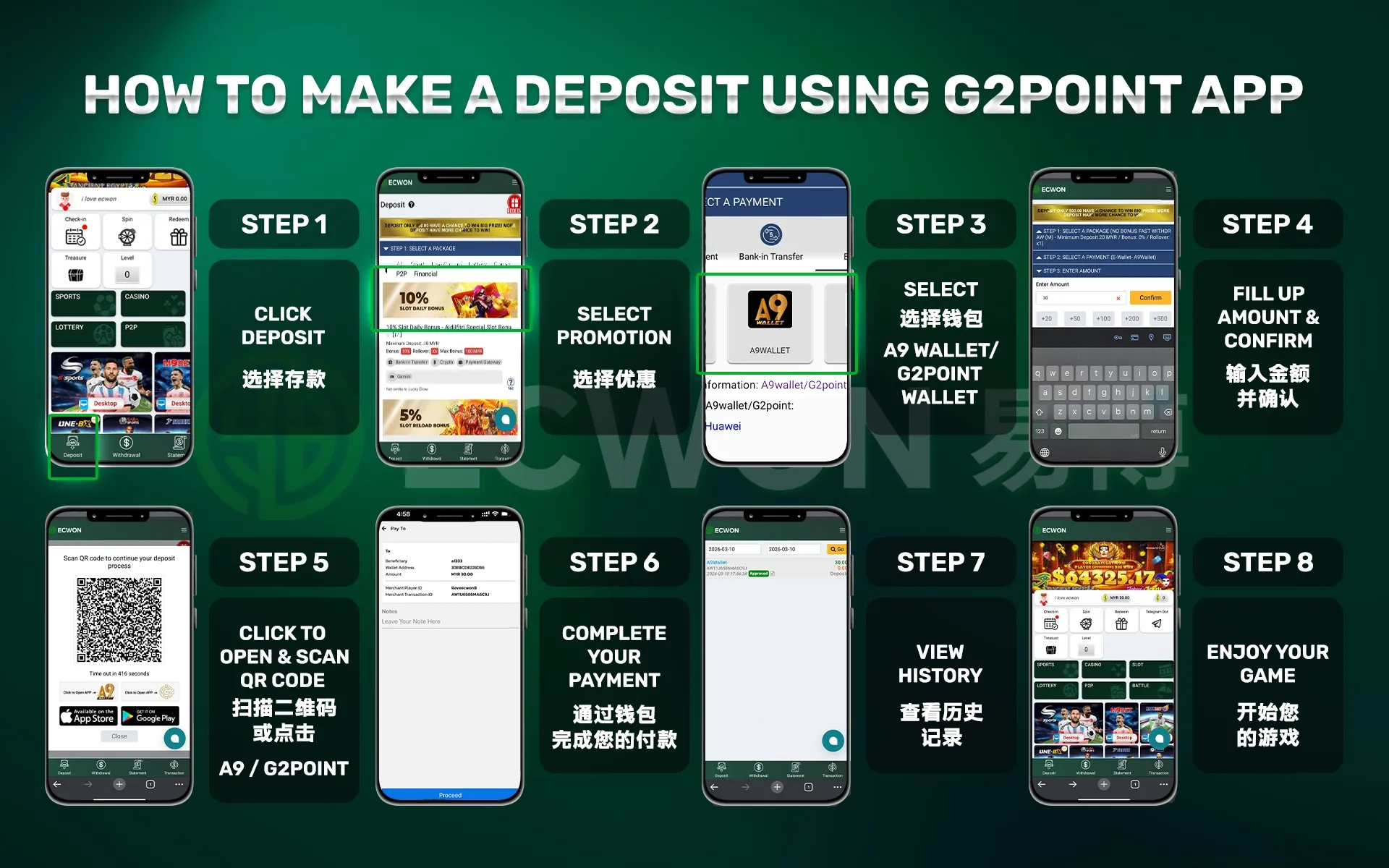
Step 1: Log in to your game ID and select "Deposit".
Step 2: Select the promotional package you wish to redeem.
Step 3: Select the G2POINT payment method to make a deposit.
Step 4: Enter the deposit amount then click "Next".
Step 5: Verify your top-up amount and promotional information, then click "Save."
Step 6: Complete the top-up via G2POINT.
After a successful top-up. you can check the status.
Note: You can also make a deposit via cash deposit (CDM), DuitNow, or bank transfer.
YOU CAN JOIN ECWON AS AN AFFILIATE MEMBER.
Step 1: Contact ECWON online customer service to obtain a referral code (e.g.: LIVECHAT / Whatsapp / WeChat/ Telegram)
Step 2: Invite friends to join ECWON or promote yourself as an ECWON partner through any social media platforms.
Step 3: Get up to 40% in permanent profits.
Step 4: Start earning.
More detail : AFFILIATE REWARD
ECWON GIFT CARD REDEMPTION GUIDE
Please follow these steps to redeem:
Step 1: Log in to your game ID and click the "Deposit" page.
Step 2: Click the redeem icon.
Step 3: Enter the redemption code and click the "Next" button.
Step 4: The summary page will display the gift card information, as shown below. Click "Save" to redeem.
Step 5: If the redemption is successful, the transaction record will be displayed on the "Cash History" and "Statement" pages.
For more details: Gifts Card Guide
START PLAYING THE GAME IN JUST A FEW SIMPLE STEPS
Please follow these steps to start the game:
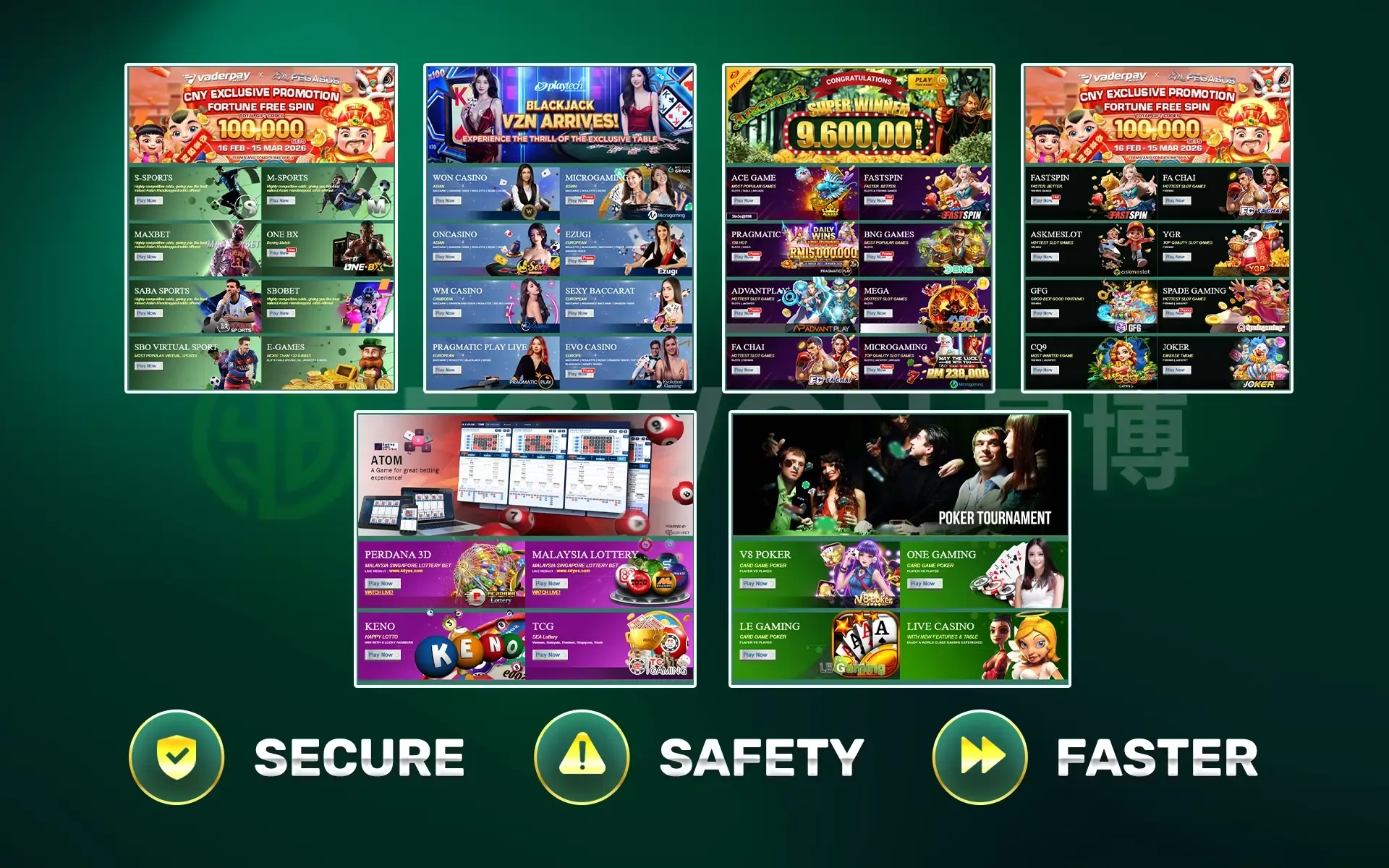
Step 1: Log in using your member ID.
Step 2: Select your preferred game product (e.g.: Live Casino / Sportsbook / Slots / 4D).
Step 3: Select a gaming platform and click "Play Now".
Start playing now and win big prizes !
EC MALL FEATURES ALLOW MEMBERS TO REDEEM THEIR FAVOURITE ITEMS USING EC POINTS.
Members can earn game points from valid bets.
1. EC points will be displayed on the top right of the member site.
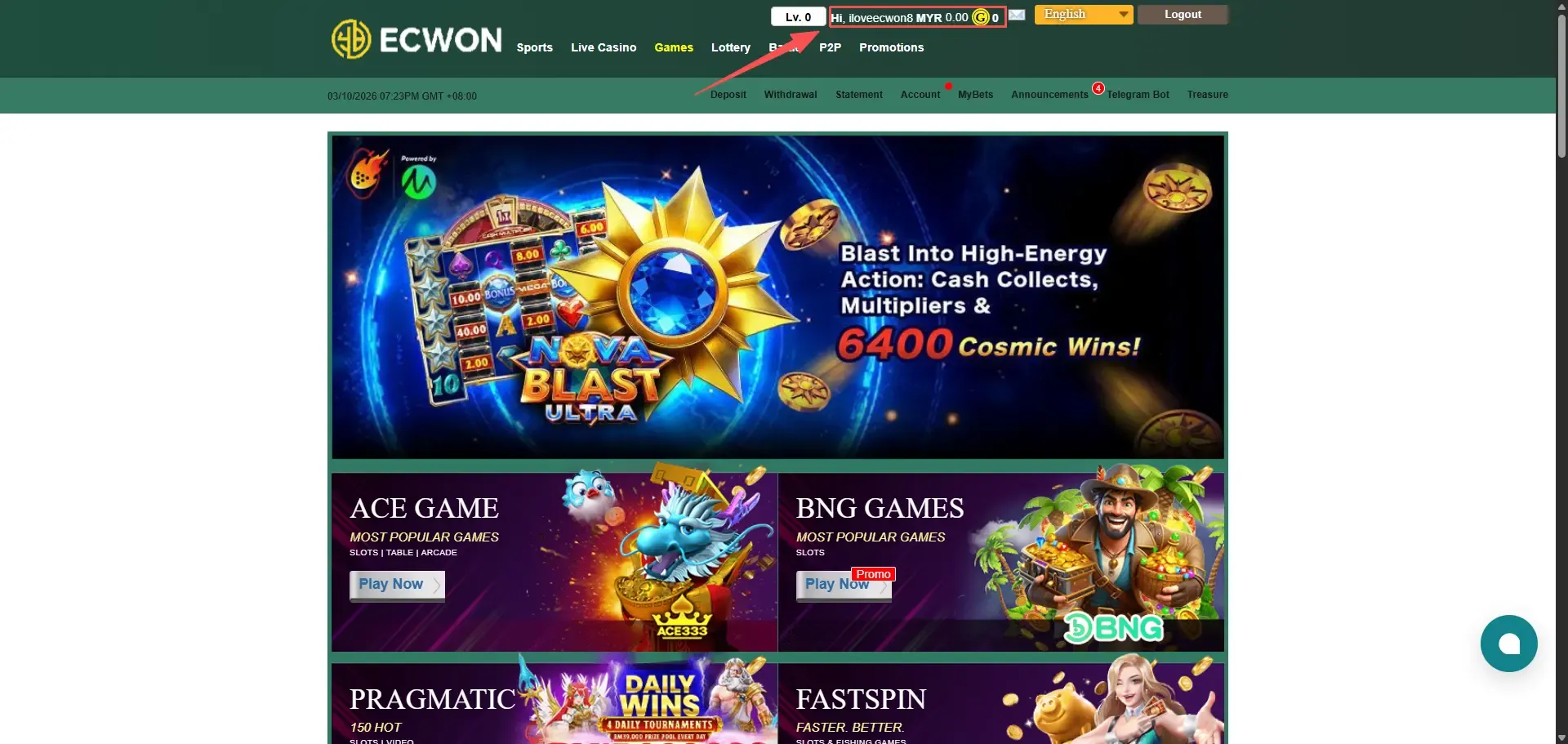
2. Members can only earn game points from valid bets, even if they ultimately lose.
3. EC points will be calculated and displayed on the member's site at 1 PM (GMT +8) the following day.
Redeem EC Points Now : EC MALL
REDEEM IT USING GAME POINT
1. Members can redeem game points for their favourite items by visiting theShoppingpage.
2. Steps to redeem favourite items using game points:
3. Add the item to your shopping cart.
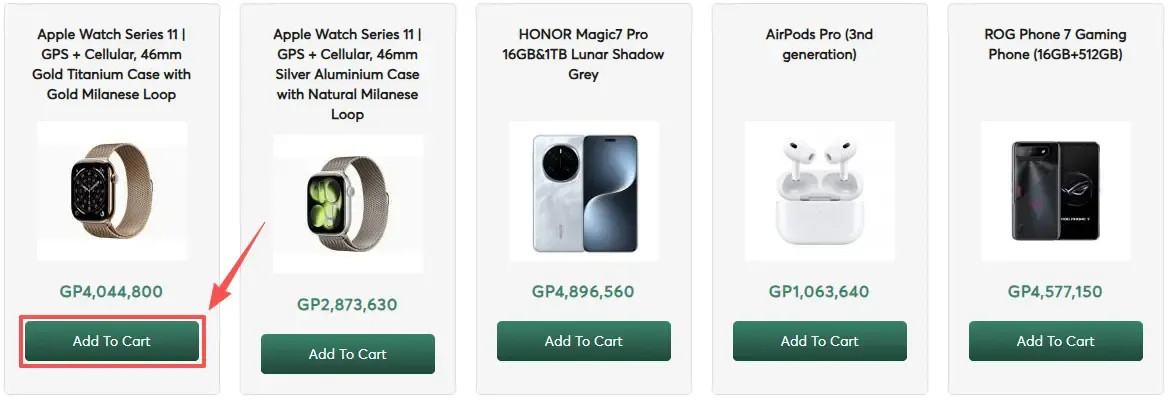
4. Log in using the member ID you registered on the member website.
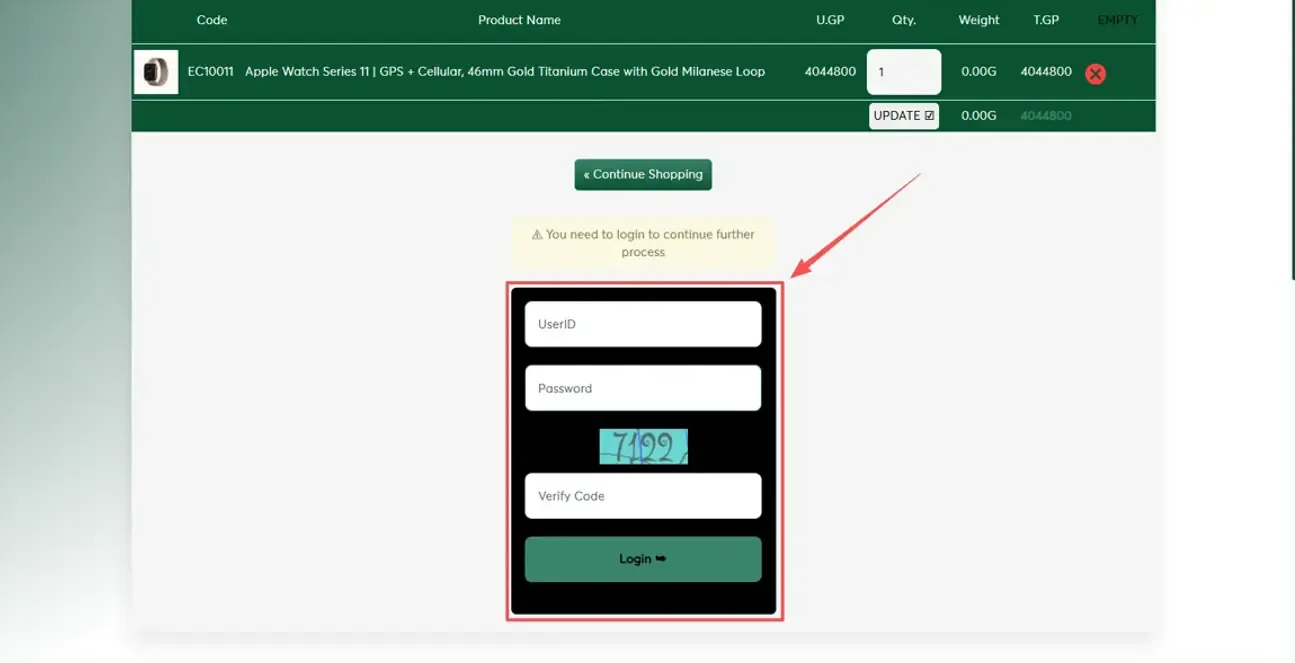
5. Click the"Checkout" button.
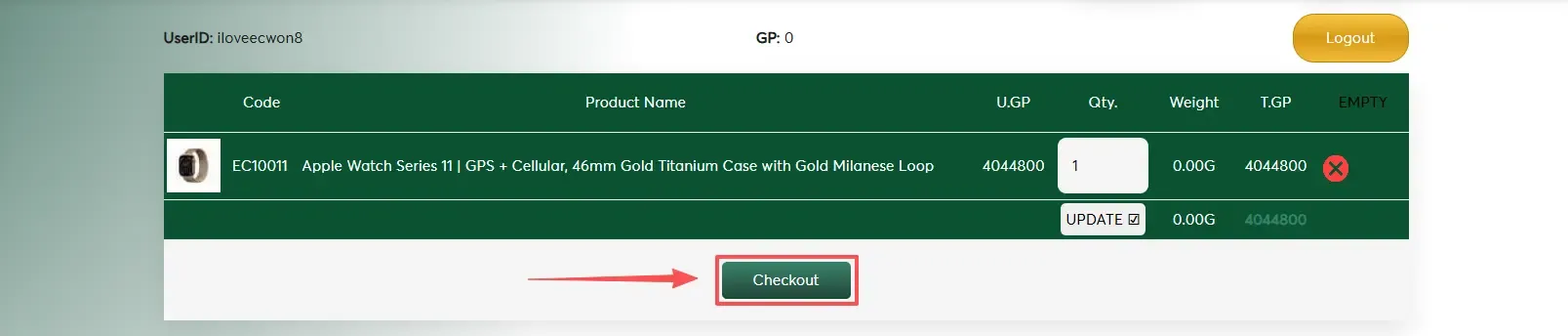
6. Enter your shipping address.
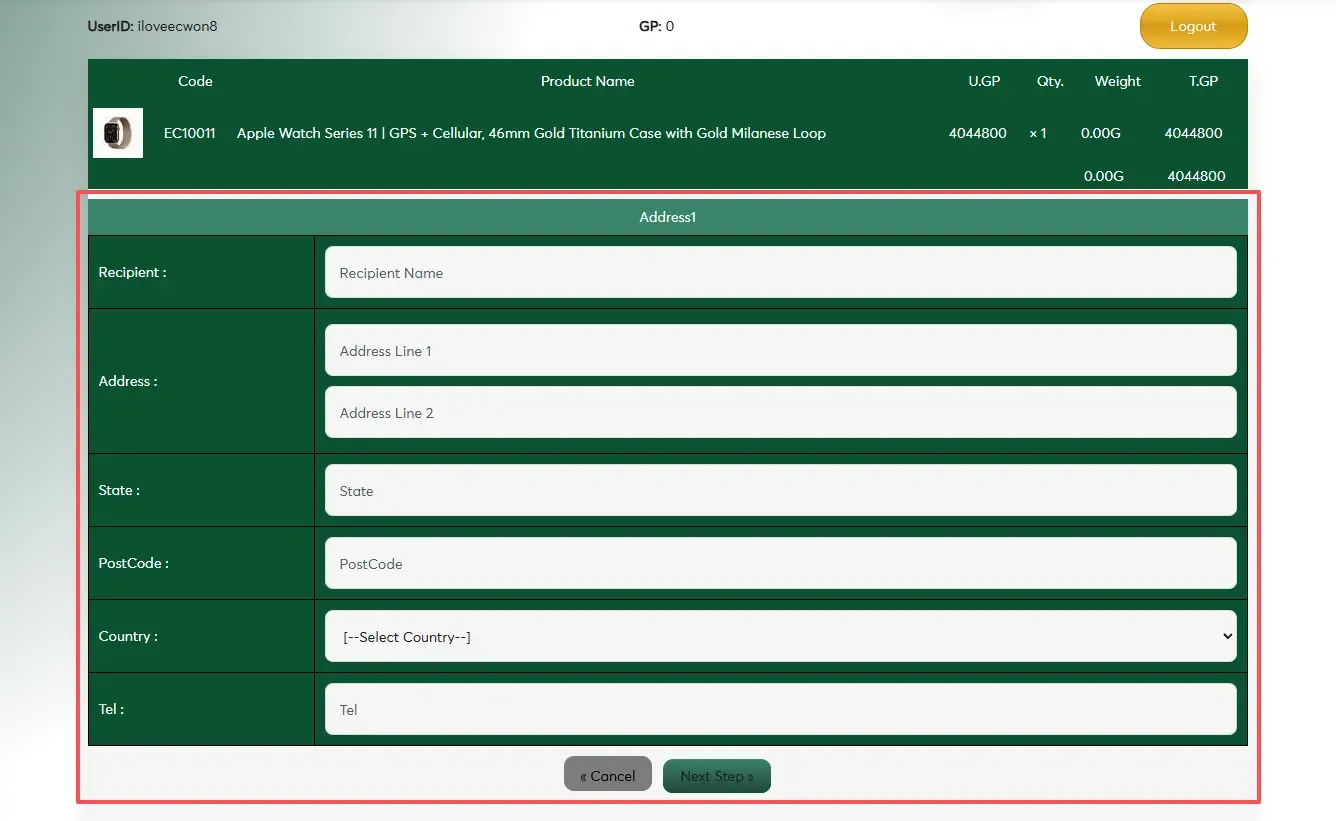
7. Proceed to checkout.
Congratulations! Your redemption was successful.
Redeem EC Points Now :EC MALL
SIMPLE STEP TO REGISTER AS A MEMBER
Please refer to the following steps for Register on Mobile:
Please refer to the following steps for Register on PC :
Step 1: Login to the website “ECWON” button.
Step 2: Click the “Register Now” button.
Step 3: Fill in registration form.
Step 4: Click the "Register Now” button to complete registration.
Step 5: Start the game.
Congratulations! You’re all set !
Four WAYS TO CONTACT US
You can contact us 24/7 via Official Livechat , Whatsapp , Telegram or Wechat in 24/7.
For more details and inquiries, please contact us : Contact-Us
EMAIL US YOUR FEEDBACK OR COMPLAINT
You can submit a feedback form to the relevant department via the following link: Feedback Form
For more details and inquiries, please contact us : Contact-Us
DEPOSIT VIA VADERPAY (PAYMENT GATEWAY)
Please follow these steps to make a deposit via mobile phone :
Please follow these steps to make a deposit via computer :
Step 1: Log in to your game account and select "Deposit".
Step 2: Select a promotional offer.
Step 3: Select your top-up deposit method 【VADERPAY / BIGPAYZ】.
Step 4: Enter the amount you wish to top-up. then click "Next".
Step 5: Please carefully check your deposit amount and game promotion information, then click "Save".
Step 6: Top up complete.
After a successful top-up. you can check the top-up status.
NOTES: You can also top-up a deposit via online transfer, cash deposit (CMD), E-Wallet (Touch'n Go, Grab Pay, Shopee Pay, Boost Pay & DuitNow).
DEPOSIT VIA BANK TRANSFER
Please follow these steps to make a deposit :
Step 1: Obtain the latest bank account information through online customer service.
Step 2: Log in to your bank account and make the transfer.
Step 3: Log in to your player account and click "Deposit".
Step 4: Select a promotional offer.
Step 5: Select bank transfer and choose the bank you wish to transfer to.
Step 6. Fill in the amount, bank account name, date, time and transfer type.
Step 7. Upload your transfer receipt as an attachment and click "Save".
After a succeesful top-up. you can check the top-up status.
DEPOSIT VIA G2POINT APP(PAYMENT GATEWAY)
Please follow these steps to make a deposit:
Step 1: Log in to your game ID and select "Deposit".
Step 2: Select the promotional package you wish to redeem.
Step 3: Select the G2POINT payment method to make a deposit.
Step 4: Enter the deposit amount then click "Next".
Step 5: Verify your top-up amount and promotional information, then click "Save."
Step 6: Complete the top-up via G2POINT.
After a successful top-up. you can check the status.
Note: You can also make a deposit via cash deposit (CDM), DuitNow, or bank transfer.
START PLAYING THE GAME IN JUST A FEW SIMPLE STEPS
Please follow these steps to start the game:
Step 1: Log in using your member ID.
Step 2: Select your preferred game product (e.g.: Live Casino / Sportsbook / Slots / 4D).
Step 3: Select a gaming platform and click "Play Now".
Start playing now and win big prizes !
EC MALL FEATURES ALLOW MEMBERS TO REDEEM THEIR FAVOURITE ITEMS USING EC POINTS.
Members can earn game points from valid bets.
1. EC points will be displayed on the top right of the member site.
2. Members can only earn game points from valid bets, even if they ultimately lose.
3. EC points will be calculated and displayed on the member's site at 1 PM (GMT +8) the following day.
Redeem EC Points Now : EC MALL
REDEEM IT USING GAME POINT
1. Members can redeem game points for their favourite items by visiting theShoppingpage.
2. Steps to redeem favourite items using game points:
3. Add the item to your shopping cart.
4. Log in using the member ID you registered on the member website.
5. Click the"Checkout" button.
6. Enter your shipping address..
7. Proceed to checkout.
Congratulations! Your redemption was successful.
>Redeem EC Points Now : EC MALL
ECWON GIFT CARD REDEMPTION GUIDE
Please follow these steps to redeem:


